


Don’t take the bait. Stop. Check. Snap Secure.

Phishing Has Changed

Cyber Villains: The Phisher, The QR Trickster and The Impostor


#CyberOctober


Remember when phishing was just badly written emails? Well, not anymore.

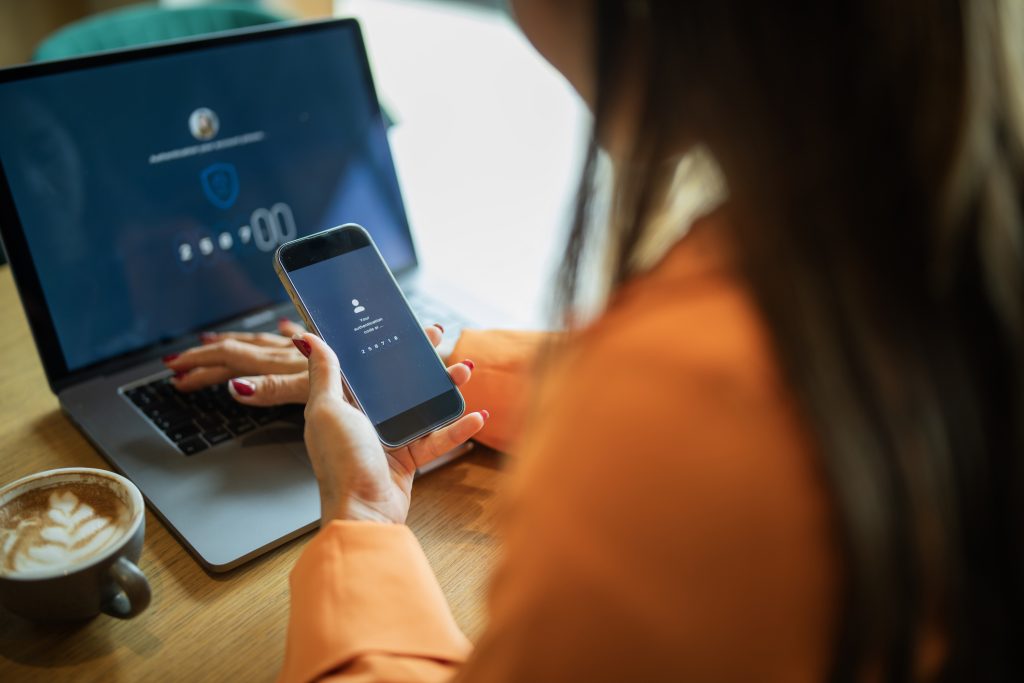
Today, phishing can look surprisingly convincing. It can land in your inbox, pop up as a text message, arrive through a Teams-style chat or even show up as a QR code. It might look like it’s from Microsoft, a supplier, a colleague or even your manager.

And as the way we manage our money and banking changes, so do the ways scammers try to catch us out. That’s one reason this matters beyond cybersecurity. It’s also part of staying safe in a more digital world.

The trick attackers use is pretty simple: get you to act before you pause to think.

Maybe there’s an urgent request to sign in. A QR code to scan. An unexpected payment or document to approve. A message telling you that something needs your immediate attention.

The message might look completely legitimate.

That’s when it’s time to pause.

If something creates urgency, asks for your credentials, sends you somewhere unexpected or changes a process you normally follow, take a moment to check it before doing anything.
 

What we want everyone to remember

  • Phishing can show up anywhere. Email, text messages, company chats, QR codes and other digital channels can all be used.
  • Don’t judge a message by its looks. Professional branding, familiar names and polished language don’t guarantee that a message is genuine.
  • QR codes deserve the same caution as links. You can’t always see where a QR code will take you until you scan it.
  • Watch for pressure. Urgency, authority, fear and curiosity are all common ways attackers try to influence what you do next.
  • If you make a mistake, report it. If you enter your credentials on a suspicious page or approve an Multi-Factor Authentication (MFA) request you didn’t initiate, tell your company’s Security / IT straight away. Fast reporting gives them a better chance to help.

Would you click it?

The Snappi Cyber Challenge

You get a message that appears to be from a senior colleague:

“I need you to review this confidential document before the meeting.
Scan the QR code and sign in now.”

The name looks right. The logo looks right. The request sounds important.

And there’s a meeting coming up.

What do you do?

Stop. Don’t scan the QR code or sign in.

Instead, verify the request through a trusted channel. Contact the person using details you already have, rather than anything included in the message.

If it looks suspicious, report it.

So, what should you do?

Stop. Don’t click, scan, reply or enter your credentials.

Take a closer look. Check the sender, the link or QR code and the request itself. Does it make sense? Is this how the process normally works?

Verify. If you’re not sure, contact the person another way. Use a phone number or contact details you already trust, not the ones in the message.

Report it. You don’t need to be 100% certain before reporting something suspicious.

Already clicked? Don’t panic. If you entered your credentials or approved an MFA request you didn’t initiate, contact Security / IT or other relevant person immediately. Reporting a mistake quickly is always better than staying quiet.

Dos

  • Take a moment before acting on an unexpected request.
  • Check sender details and where links or QR codes are taking you.
  • Treat unexpected QR codes with the same caution as suspicious links.
  • Report something that feels off, even if you’re not completely sure.

Don’ts

  • Don’t trust a message just because it looks professional.
  • Don’t enter your credentials after following an unexpected link or QR code.
  • Don’t approve an MFA request you didn’t initiate.
  • Don’t worry about admitting you clicked something by mistake. The sooner you report it, the better.

Remember: Stop. Check. Verify. Report.

Sometimes the safest thing you can do is nothing for a few seconds.

Ready to test what you’ve learned?


Take this quick four-question quiz to check your understanding!

Read also

Lorem ipsum dolor sit amet, consectetur adipiscing elit. Ut elit tellus, luctus nec ullamcorper mattis, pulvinar dapibus leo.

Don’t take the bait. Stop. Check. Snap Secure.

Phishing Has Changed

Cyber Villains: The Phisher, The QR Trickster and The Impostor


#CyberOctober


Remember when phishing was just badly written emails? Well, not anymore.

Today, phishing can look surprisingly convincing. It can land in your inbox, pop up as a text message, arrive through a Teams-style chat or even show up as a QR code. It might look like it’s from Microsoft, a supplier, a colleague or even your manager.

And as the way we manage our money and banking changes, so do the ways scammers try to catch us out. That’s one reason this matters beyond cybersecurity. It’s also part of staying safe in a more digital world.

The trick attackers use is pretty simple: get you to act before you pause to think.

Maybe there’s an urgent request to sign in. A QR code to scan. An unexpected payment or document to approve. A message telling you that something needs your immediate attention.

The message might look completely legitimate.

That’s when it’s time to pause.

If something creates urgency, asks for your credentials, sends you somewhere unexpected or changes a process you normally follow, take a moment to check it before doing anything.


What we want everyone to remember

  • Phishing can show up anywhere. Email, text messages, company chats, QR codes and other digital channels can all be used.
  • Don’t judge a message by its looks. Professional branding, familiar names and polished language don’t guarantee that a message is genuine.
  • QR codes deserve the same caution as links. You can’t always see where a QR code will take you until you scan it.
  • Watch for pressure. Urgency, authority, fear and curiosity are all common ways attackers try to influence what you do next.
  • If you make a mistake, report it. If you enter your credentials on a suspicious page or approve an Multi-Factor Authentication (MFA) request you didn’t initiate, tell your company’s Security / IT straight away. Fast reporting gives them a better chance to help.

Would you click it?

The Snappi Cyber Challenge

You get a message that appears to be from a senior colleague:

“I need you to review this confidential document before the meeting.
Scan the QR code and sign in now.”

The name looks right. The logo looks right. The request sounds important.

And there’s a meeting coming up.

What do you do?

Stop. Don’t scan the QR code or sign in.

Instead, verify the request through a trusted channel. Contact the person using details you already have, rather than anything included in the message.

If it looks suspicious, report it.

So, what should you do?

Stop. Don’t click, scan, reply or enter your credentials.

Take a closer look. Check the sender, the link or QR code and the request itself. Does it make sense? Is this how the process normally works?

Verify. If you’re not sure, contact the person another way. Use a phone number or contact details you already trust, not the ones in the message.

Report it. You don’t need to be 100% certain before reporting something suspicious.

Already clicked? Don’t panic. If you entered your credentials or approved an MFA request you didn’t initiate, contact Security / IT or other relevant person immediately. Reporting a mistake quickly is always better than staying quiet.

Dos

  • Take a moment before acting on an unexpected request.
  • Check sender details and where links or QR codes are taking you.
  • Treat unexpected QR codes with the same caution as suspicious links.
  • Report something that feels off, even if you’re not completely sure.

Don’ts

  • Don’t trust a message just because it looks professional.
  • Don’t enter your credentials after following an unexpected link or QR code.
  • Don’t approve an MFA request you didn’t initiate.
  • Don’t worry about admitting you clicked something by mistake. The sooner you report it, the better.

Remember: Stop. Check. Verify. Report.

Sometimes the safest thing you can do is nothing for a few seconds.

Ready to test what you’ve learned?


Take this quick four-question quiz to check your understanding!

Lorem ipsum dolor sit amet, consectetur adipiscing elit. Ut elit tellus, luctus nec ullamcorper mattis, pulvinar dapibus leo.
Get the Snappi app

Scan the QR code to download the app

Click to download the app

or get a download link via SMS

Due to scheduled maintenance on gov.gr, the identity verification required to open a Snappi account will be temporarily unavailable 4/10 until 14:00 (Greek time) on Sunday, 4 October.

If you’d like to open a Snappi account, we recommend trying again after this time.

Thank you for your understanding!

Get the app